
How to organize fact collection in a large construction project

From my experience I can say for sure that it is not so difficult to create a schedule network model than to subsequently maintain it up-to-date "in dynamics", corresponding to project management standards as the project progresses.
In addition, updating schedule network models is, as a rule, a much more labor-intensive task than their formation.
For example, in the ROSPAN-GAZ project in 2012, it took me approximately 1.5 months to create a schedule network model, and keeping the model up to date required my constant work with a 100% load.
That is, over the course of a year, the labor costs for updating the model were almost 10 times higher than the labor costs for its development.
It is during actualization that most problems arise, which, as I wrote earlier, often ultimately lead to the picture "the schedule lives its own life, and the project lives its own life."
One of these problems is the organization of the fact collection process. I will discuss issues related specifically to this process in more detail in the current article.
Globally, there are 4 possible approaches to fact collection.
1. Receiving data from the performer orally
This option is possible in individual cases, but I highly recommend not using it as a basis for systemic work. Sooner or later it will end with misunderstandings such as "I didn't say that", "you misunderstood" or simply failure to provide information.
In addition, conveying information orally on hundreds and thousands of graphic works is, to put it mildly, problematic.
2. Using Excel exchange forms
A good option for collecting facts when working with small amounts of information, but not a recommended option for collecting facts when maintaining detailed schedules of design and construction work, materials and equipment, and construction work.
The algorithm for working with exchange forms is approximately as follows:
- the planner uploads the schedule for each performer into Excel for his current work and sends it to the performer by email or other means;
- the performer enters the necessary data into the Excel form and sends it back to the planner.
An example of such an exchange form is shown below.
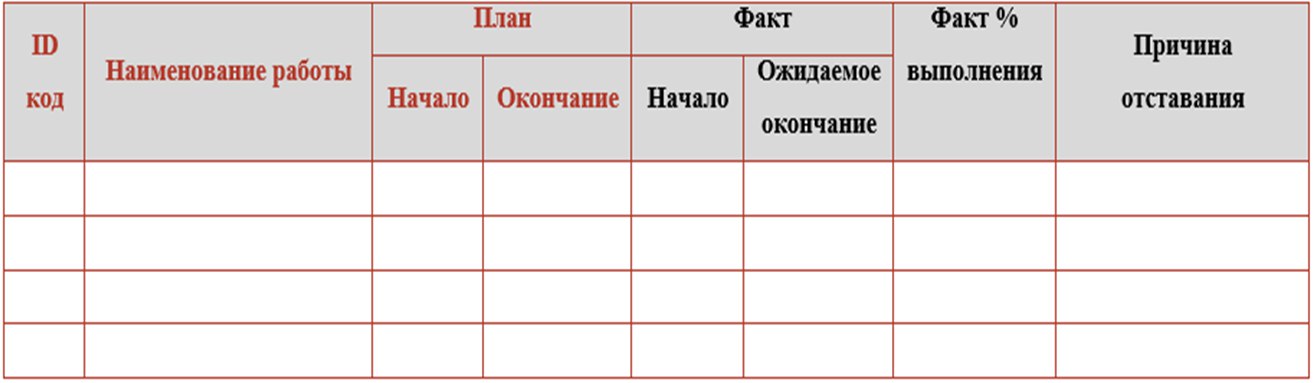
Columns with red headings here are unloaded from the schedule network model, and columns with black columns are filled by the executor. The process of unloading such a form from the KSM and loading data back can be automated.
3. Entering data by each performer directly into the schedule network model
A nightmare option (if you are not a vendor or a consultant implementing an PMIS).
First of all, this is expensive because software licenses will need to be purchased not only for planners, but also for functional specialists (designers, procurement, on-site engineers). This will increase the cost of purchasing licenses by an order of magnitude. In addition, extensive training will be required to work in the PMIS, which also requires time and money.
Secondly, this is labor-intensive because it creates an additional burden on functional specialists.
Thirdly, Any document must have an owner. And the schedule network model is the key document for the project. And one person should be responsible for it - the planner.
If each performer independently enters data into the CSM, collective irresponsibility will arise. In addition, as I described in one of the previous articles, after entering the fact, it is necessary to assess the impact of deviations on the project timeline and prepare analytical reporting. This can only be done by analyzing the overall picture of the project. Several people, each of whom is responsible for their own section of the schedule, will not be able to do this.
But this option is very popular among vendors and consultants affiliated with them - just imagine how many licenses can be sold in this case.
4. Synchronization with plans of performers/integration with related systems
The best option.
I strongly recommend that before introducing any forms of reporting, first of all, talk to functional specialists and ask how they themselves plan and track their work. There is a 90% chance that some form of operational plans and reports exist in each functional area. Often these can be simple tables in Excel, and sometimes downloads from your own information systems.
The best option for organizing work is to synchronize the schedule network model with existing operational plans and reports in functional areas. At the same time, the plans of the performers for the coming period should be formed from the general schedule network model for the project. Next, the updated operational plans are used to update the CMS.
Often, already existing reporting forms for performers contain all the necessary information for updating the ICM, and sometimes it is enough to just slightly adjust the existing forms.
Next, I will consider the most common (in my practice) source data formats for updating the KSM for the main types of work performed during the implementation of an investment and construction project.
4.1. Design (development of documentation for the "PD" and "RD" stages, development of design documentation for equipment)
Option 1. Register of drawings (master list, documentation list) with documentation statuses in MS Excel. An example is shown below in the figure.
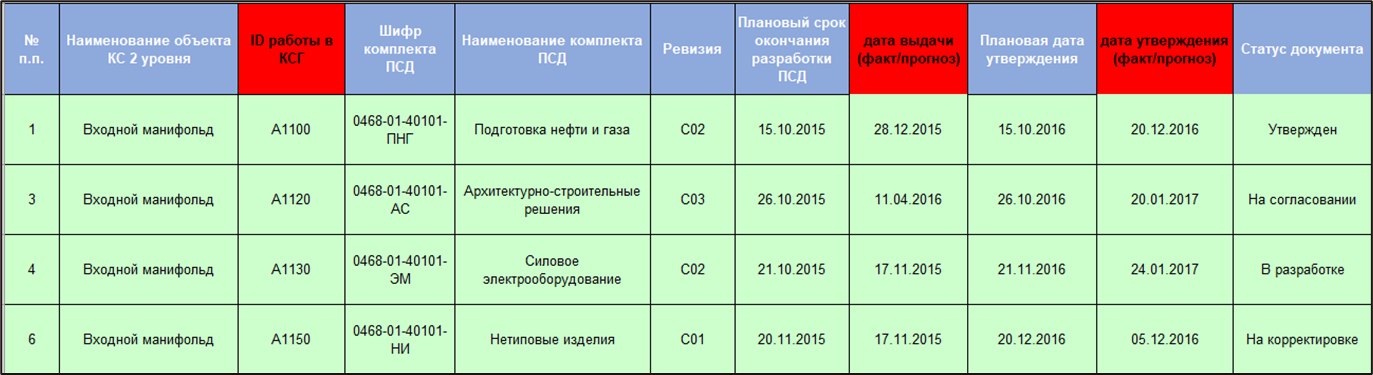
Option 2. Upload from document management/design management information system. If the project uses BIM or simply an information system that tracks the movement of documentation, logically, all the necessary data can be downloaded from there.
4.2. Engineering surveys
In terms of field engineering surveys, it is necessary to track the physical volume of work; a good format for this is a monthly-daily schedule. More details about it below - in the section on construction and installation works.
For desk work on engineering surveys, you can use the Excel exchange form (see point 2 above) or operational plans of functional specialists in Excel.
4.3. Land acquisition and obtaining permits
You can use Excel exchange forms (see point 2 above) or operational plans of functional specialists in Excel.
4.4. Procurement and supply of materials and equipment
In large-scale projects, as a rule, an appropriate information system is used to manage supplies. In Russian practice, most often SAP or 1C. It is necessary to integrate with these systems and automate the loading of data from there into the schedule network model.
4.5. Construction, installation and commissioning works (construction, installation and commissioning works)
In construction and installation work, it is necessary to track not just the start/completion dates of work, but the physical volume of work.
Here, I consider the most optimal option to synchronize KSM and monthly-daily schedules of construction and installation work in Excel.
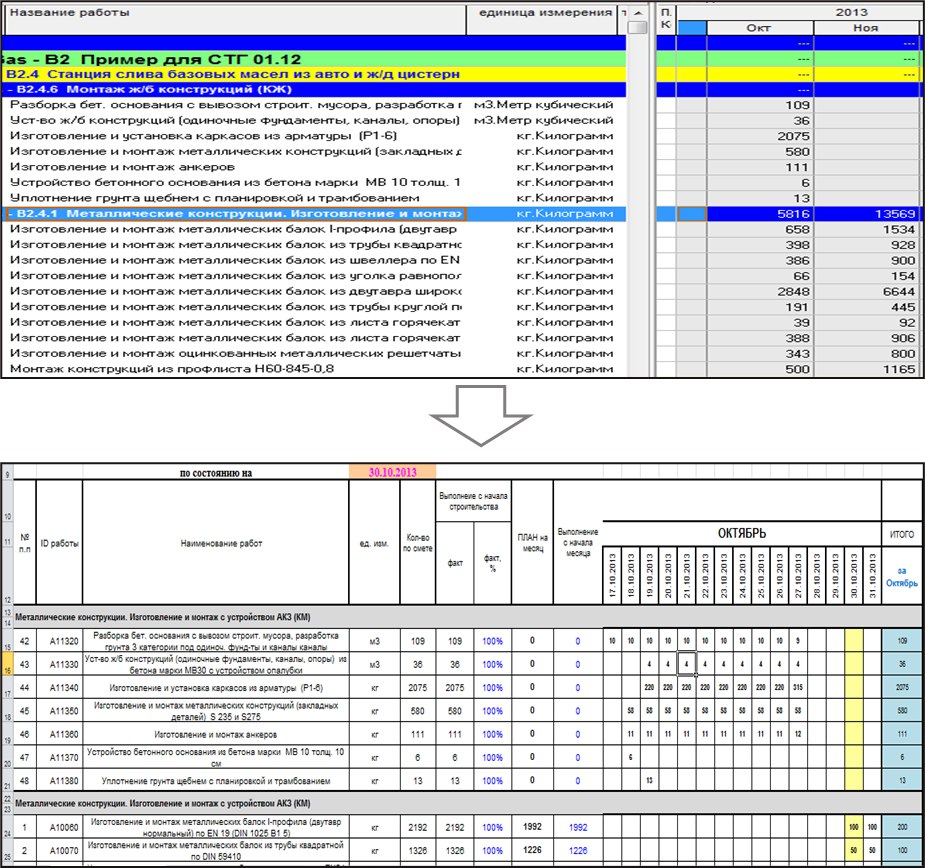
At the beginning of the month, the monthly-daily work schedule for each contractor is downloaded from the KSM (the download is formed based on the distribution of physical volumes of work by time period).
Next, the builders daily enter the physical volume facts into Excel for a month. And this Excel with the entered fact is the source of data for updating the KSM.
4.6. Obtaining permits and other administrative work
You can use Excel exchange forms (see point 2 above) or operational plans of functional specialists in Excel.
Of course, in large-scale projects, the loading of actual data into the KSM needs to be automated - in my opinion, our partners, developers, do an excellent job with this task Periscope software.
In general, the optimal approach to organizing monitoring of large construction projects, in my opinion, is as follows:
- The schedule network model is used as a tool for medium- and long-term planning (planning horizon for several years in advance until the end of the project).
- For the purposes of short-term planning and control, operational plans of functional specialists are used.
- The operational plans of the performers and the SCM are synchronized, the processes of uploading and downloading data between them are automated.